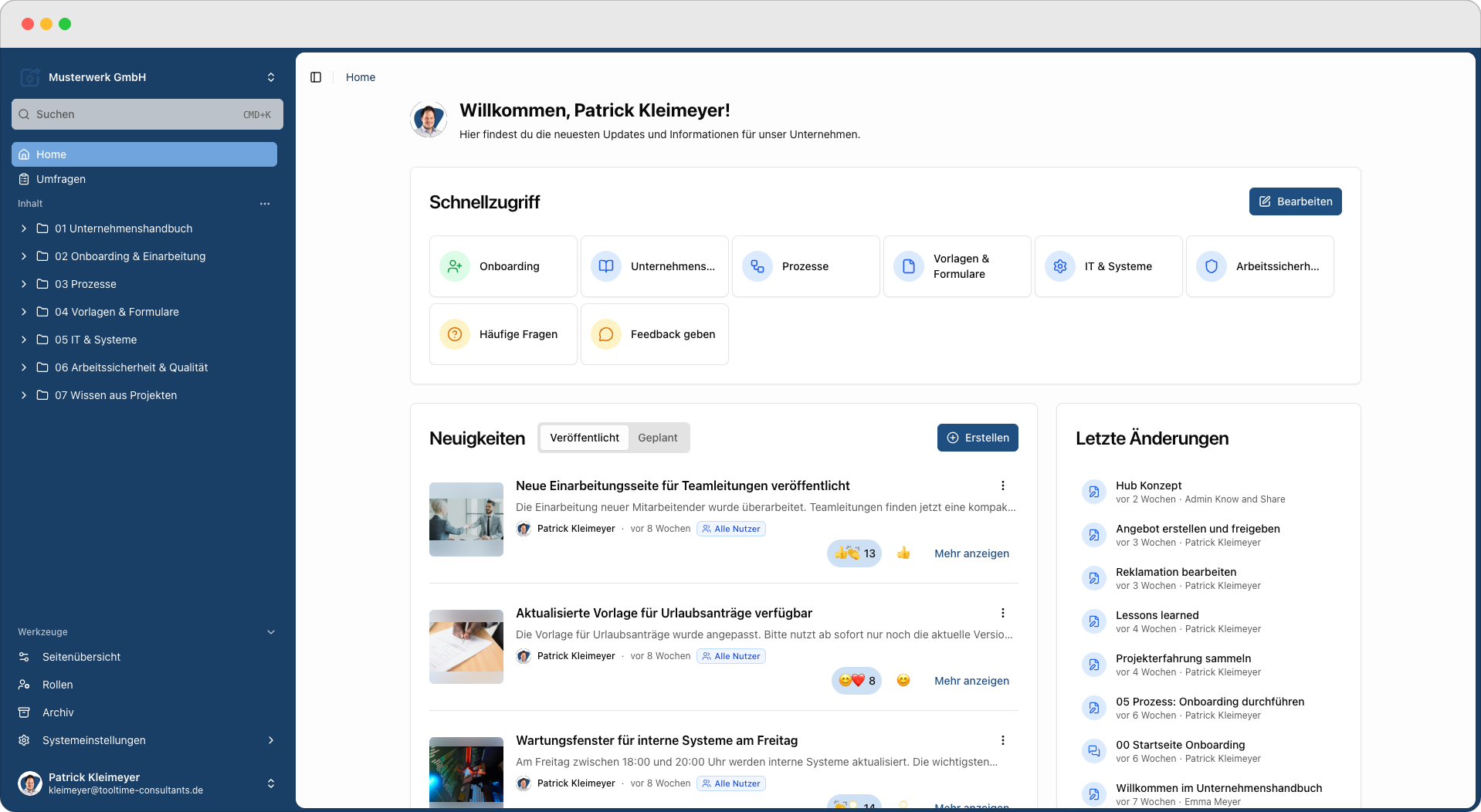
Version 3 of KNOW&SHARE is live. Unlike the updates of the past years, this is not a single new feature but a reworked platform: we have brought the functions that grew over the years together into one connected whole.
The real reason for this step, however, does not lie in the software. It lies in a question that has changed over the past two years.
The question has changed
For a long time the question in knowledge management was: where do we store our knowledge so everyone can find it? Today companies ask a different one: which AI should we use? – ChatGPT, Copilot, Claude, an assistant of their own. In our view the more important question starts one step earlier: which knowledge is this AI actually allowed to access – and how do we know it is current, reviewed and permitted for the person asking?
Because an AI phrases things convincingly. That does not make an outdated work instruction any more correct. If knowledge is spread across ten storage locations, if three versions of the same document exist in parallel and nobody knows which one applies – that problem does not disappear through AI. It simply reappears somewhere new: in an answer that sounds confident and is wrong nonetheless.
AI does not make knowledge management obsolete. It makes a reliable knowledge base more important than ever. That is exactly what Version 3 is built for.
What makes a knowledge source trustworthy
Trust is not a feeling that software creates. It comes from properties you can verify. Knowledge that both people and AI can rely on is:
- •structured – it has a recognisable form, not loose walls of text
- •current – because maintaining it is easy enough that it actually happens
- •approved – someone has taken professional responsibility for it
- •versioned – changes remain traceable
- •permission-based – everyone sees exactly what they are allowed to see
- •findable – in the context of work, not after a long search
These six points are the thread running through Version 3, sorted by what you actually do with knowledge day to day: create it, govern it, use it.
From grown over time to one whole
When a product grows over the years, experience accumulates – but over time a lot ends up sitting side by side that actually belongs together. Instead of adding the next building block, we rethought the whole: for Version 3 we rebuilt the platform and brought everything we have learned together into one clear structure. Interface, editor, content and home page now fit together and interlock. A large part of these improvements comes directly from your feedback.
1. Creating knowledge easily
A knowledge platform is only as good as the content that actually gets created and maintained. That is why the editor was our most important lever: the lower the barrier, the more likely your knowledge is genuinely up to date.
The new editor
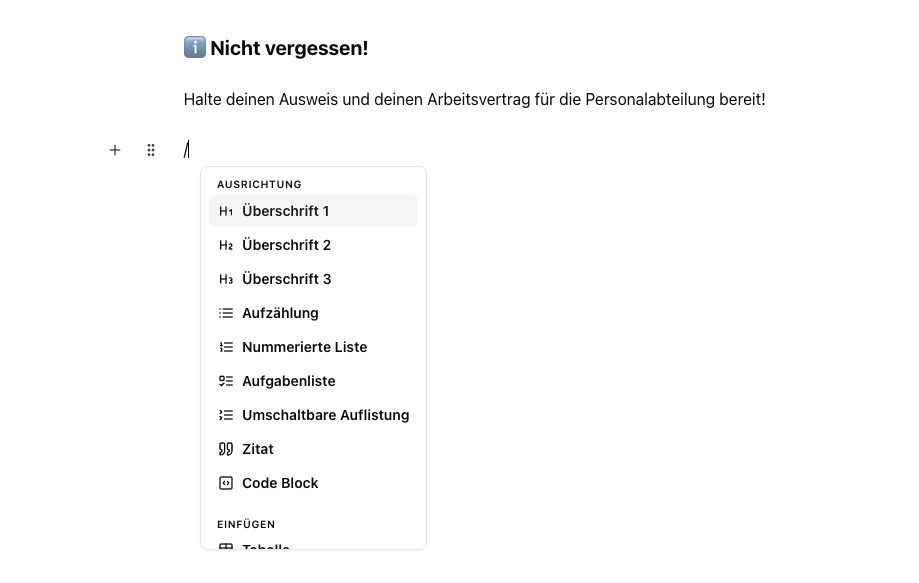
In Version 3 you create content with a modern block editor. Every paragraph, table and image is its own block that you can move, copy and rearrange via drag & drop. With the „/" command you insert headings, lists, tables and more in seconds, and an inline menu shows the right formatting options directly on the selected text. If you like, an AI assistant helps with writing and refining – you decide what to keep.
- •Move, copy and rearrange blocks via drag & drop
- •Insert elements in an instant using the / command
- •Format directly on the text via the inline menu
Why this matters: knowledge rarely fails because of a lack of willingness, but because of effort. An editor that does not get in the way is the precondition for expertise being documented where it actually sits – in the departments.
Interactive knowledge pages
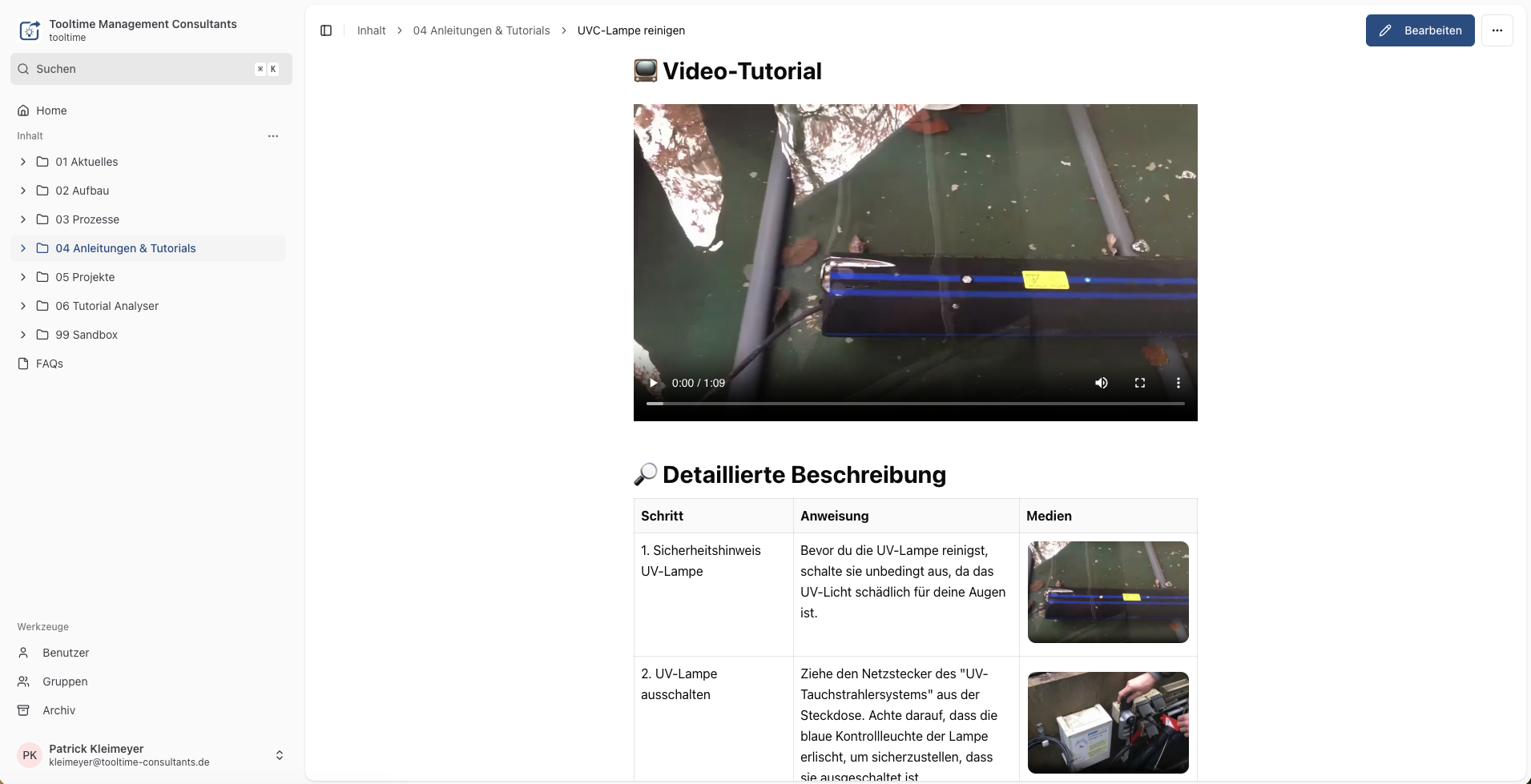
Knowledge sticks better when it is more than plain text. In Version 3 you build lively pages with embedded videos and audio, checklists to tick off, info panels for important notes and a tidy process table for clear workflows. This way a work instruction can take exactly the form that makes it understandable for the task at hand: a short video for the handling, a checklist for the sequence, an info panel for the safety notes.
- •Videos, audio, checklists and info panels directly on the page
- •Tidy process table for clear workflows
- •Structured page elements instead of long blocks of text
Why this matters: a common obstacle is the idea that experts have to write perfect documentation straight away. They do not. If a short recording, a checklist and a few images are enough, knowledge is created where the expertise sits – and an editor turns it into a page everyone understands.
The tidy process table
A process diagram shows a workflow. The knowledge you need to carry it out usually sits somewhere else – in a guide, a template, in a colleague’s head. The process table brings the two together: work steps, people involved, required knowledge and the matching resources in one place. That clarity does not only help people. Unambiguous steps with assigned roles and resources are far easier for an AI to interpret than disconnected prose. Structure pays off twice.
2. Governing knowledge securely
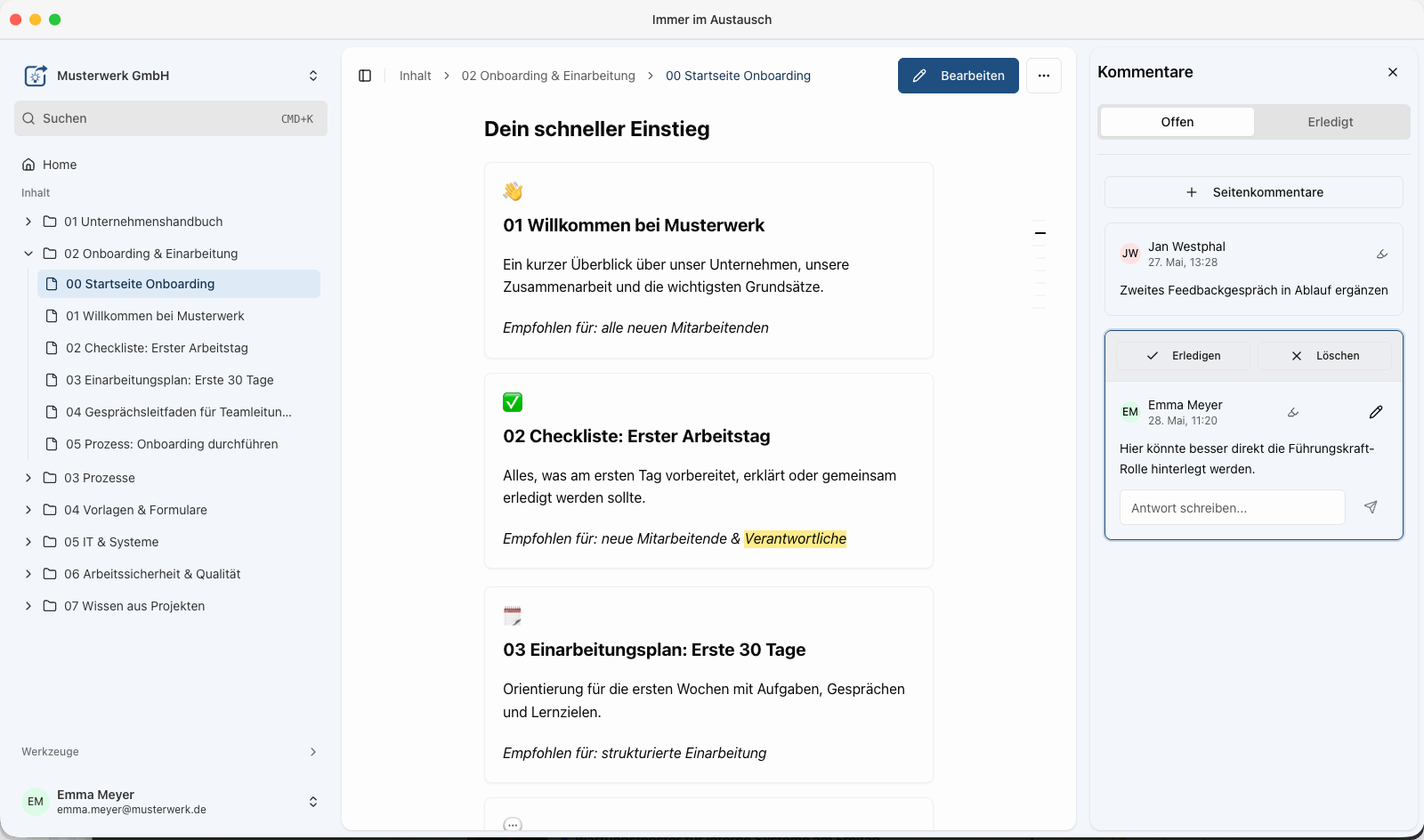
Open knowledge maintenance only works when it is clear who is allowed to do what. Otherwise „everyone can join in" quickly turns into „nobody knows what applies any more". That is why KNOW&SHARE combines easy creation with real governance:
- •Roles and permissions down to page level – who may read, edit, administer
- •Multi-step approval workflows for content that has to be reviewed before publication
- •Versioning of pages and files – changes remain traceable
- •Defined responsibilities and notifications about relevant changes
- •SSO and integration with existing directory services for user management
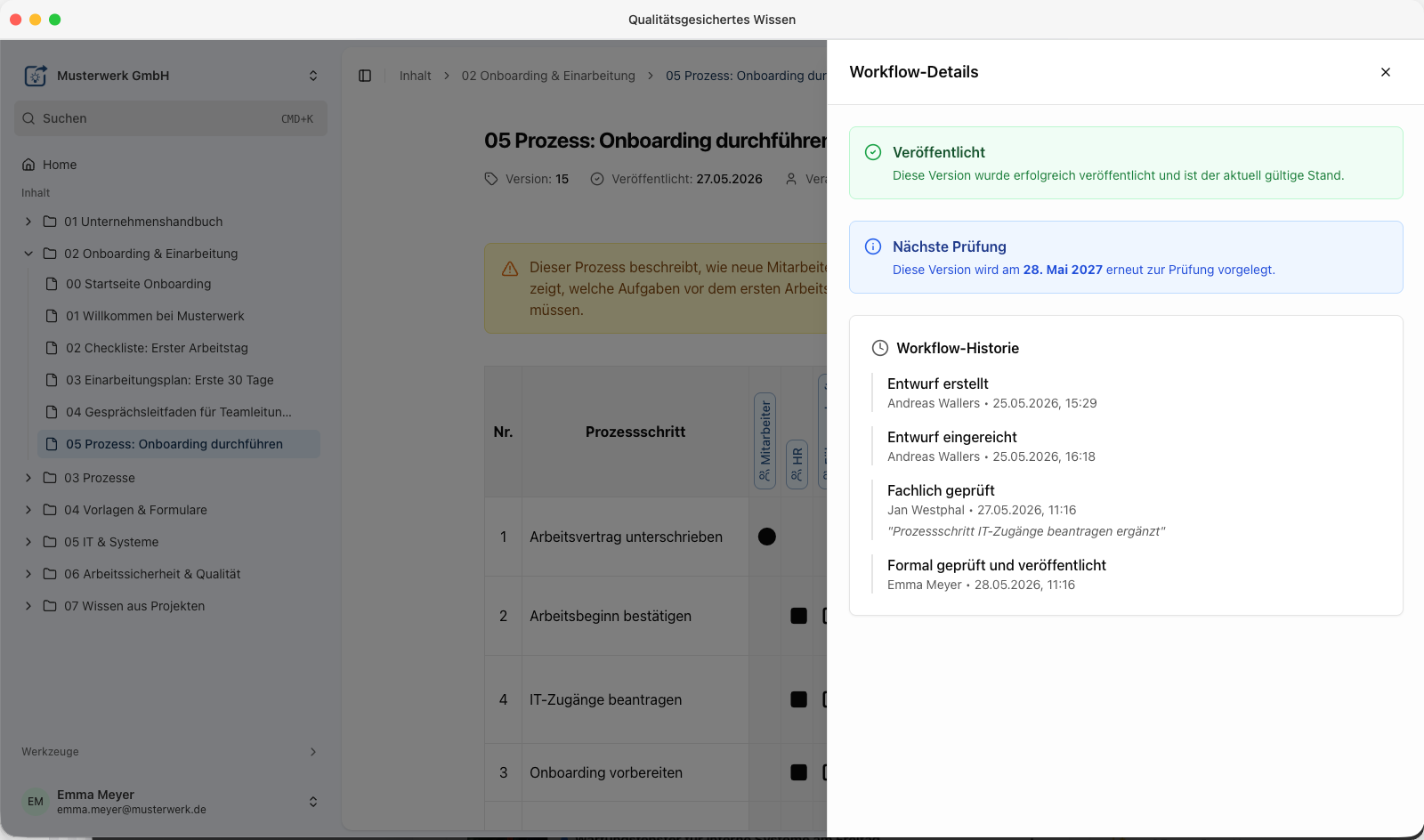
Why this matters: it is not the AI assistant that decides which knowledge applies in your company. You define that – in your knowledge source. This governance is the reason the result can be trusted in the first place.
3. Using knowledge reliably
The entry point has been rethought: the home page now brings the essentials together in one place. Quick access takes you to key content with a single click, the news area lets you share updates and reactions with your team, and recent changes show at a glance what has happened most recently. The global search takes you to the right page in an instant.
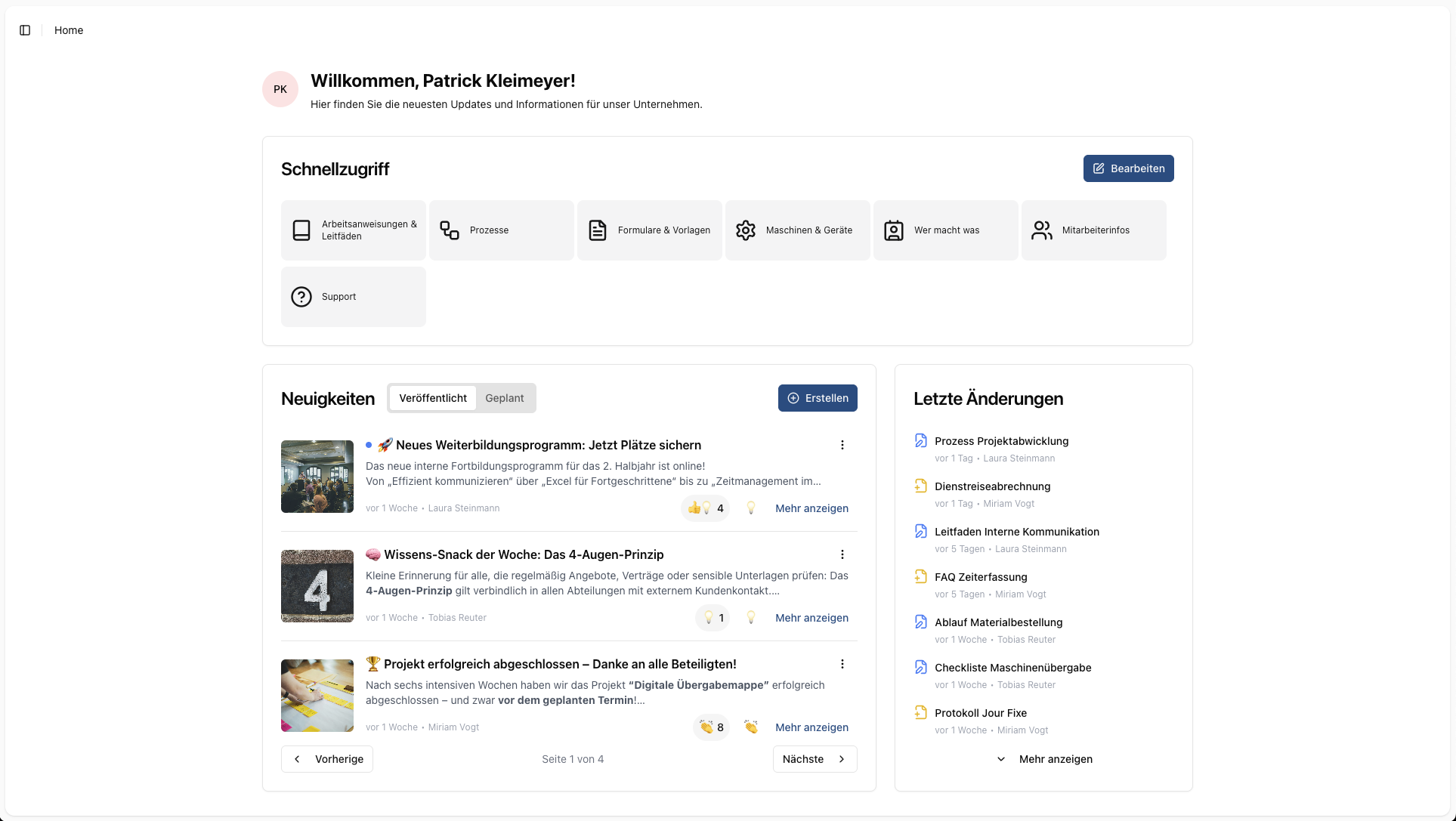
Because KNOW&SHARE is browser-based and responsive, this works at the desk just as well as on a tablet or smartphone – and a QR code on a machine, in a building or out in the field leads straight to the right knowledge page.
New: the MCP interface for AI assistants
A real first in Version 3 is the MCP interface (Model Context Protocol). It lets you connect AI assistants like Claude or ChatGPT directly to the knowledge in KNOW&SHARE. When you ask your assistant something, it no longer answers out of thin air but based on your real content – your processes, guides and documentation. It stays secure, because the interface uses the same permissions as the platform: everyone only sees what they can access in KNOW&SHARE too. And if you like, the assistant can even create new pages or update existing ones – always under your control and within your approvals.
- •Use knowledge from KNOW&SHARE directly in Claude, ChatGPT and more
- •Answers based on your real content instead of generic AI guesses
- •Same permissions as in the platform – everyone only sees what they may
One source instead of many knowledge islands
The decisive point is not the technical acronym MCP. What matters is what it prevents. Companies will use several AI assistants in future: a general one, one from their platform vendor, perhaps a dedicated one for service. If each of these assistants gets its own knowledge base, in a few years you will be exactly where you were before knowledge management – with scattered versions, unclear responsibilities and triple the maintenance effort.
With KNOW&SHARE you maintain one knowledge base. Employees use it in the browser and on mobile, authorised AI assistants use it via MCP. Everyone works from the same state – the one you have approved.
What this looks like day to day
An example that connects several of these building blocks:
- •An experienced colleague explains a rarely needed workflow – a short video, a few bullet points.
- •An editor turns it into a knowledge page: checklist, images, process table. The AI assistant in the editor helps with wording and structure if wanted.
- •The person professionally responsible reviews and approves it.
- •Weeks later a colleague scans the QR code on the machine and has the guide in front of them.
- •And when someone asks their AI assistant about that exact workflow, it answers based on the same approved page.
The value does not lie in any single step. It lies in the unbroken chain – from experience in someone’s head to responsible use by people and AI.
That is a selection of the most important changes. If you would like to see more, you will find the key features together in one place.
Your path into the new world
Nothing changes for you overnight – your existing system keeps running. We shape the switch together and at your pace. Here is what the path looks like:
- •See it now: Get a first impression of Version 3 in the interactive tour and in our dedicated articles.
- •Migration: With our migration solution we transfer your existing content into the new version in a structured and secure way – without any loss of knowledge.
- •Aligning together: In the coming weeks we will actively reach out to you and align the next steps with you individually.
- •Switch & support: We plan your move and support you all the way to a smooth go-live in Version 3.
Curious?
Knowledge is only valuable when people and AI can trust it. With Version 3 you have the tools for that – and the control stays with you. Take a look at Version 3 for yourself – in the interactive tour right here on our site. Or talk to us directly: just pick a time that suits you.
Arrange a personal conversation:
Open the booking calendar